

Tired of WiFi Dead Zones in Your Home?
Get professional help from local specialists who understand wifi dead zones and wifi signal weak areas.
Servicing Boksburg, Paarl, Westville, and across South Africa
What Causes WiFi Dead Zones in Homes: The Complete Guide
📡 You have WiFi, but not everywhere—here’s why dead zones happen and how to fix them.
You’ve got a fast fibre connection. Your router is brand new. But there are still parts of your home where the WiFi doesn’t work. Your bedroom has one bar. The home office has no signal at all. You’re frustrated and confused.
The question what causes wifi dead zones in homes is one I hear from almost every homeowner. WiFi dead zones are incredibly common, but they’re not random. There are specific reasons why certain areas of your home have weak or no signal—and once you understand them, you can fix them.
In this comprehensive guide, I’ll explain everything about wifi dead zones and wifi signal dead spots. I’ll answer why are there dead zones in my house wifi, cover wifi dead zones in double storey house, wifi dead zones in thick brick walls, and show you how to find wifi dead zones in house. Whether you’re in Boksburg, Paarl, or Westville, this guide will help you eliminate dead zones.
For more on solving dead zones, check out our fix weak WiFi signal and WiFi extender installation guides. Let’s find and fix your dead zones.
📋 Table of Contents – WiFi Dead Zones Guide
📡 What Are WiFi Dead Zones?
Before we dive into what causes wifi dead zones in homes, let’s define them.
What Is a WiFi Dead Zone?
A wifi dead zone is an area in your home where the WiFi signal is too weak to connect or is completely non-existent. It’s a spot where your devices show zero bars or constantly disconnect.
Signs of a Dead Zone:
- No signal: Zero bars on your device.
- Weak signal: One bar, constantly dropping.
- Slow speeds: Pages take forever to load.
- Frequent disconnections: Your device keeps disconnecting.
How Common Are Dead Zones?
Very common. Most homes have at least one dead zone. Large homes, homes with thick walls, and multi-storey homes are more likely to have dead zones.
Why Dead Zones Matter:
- Frustration and inconvenience.
- Reduced productivity.
- Poor streaming and gaming experience.
- Inability to use smart home devices.
For more on wifi signal strength, see our WiFi optimisation guide.
📏 Distance from the Router
Distance is the most basic cause of wifi dead zones.
How Distance Affects WiFi:
WiFi signals weaken over distance. The further you are from the router, the weaker the signal. This is why rooms far from the router often have wifi signal weak areas.
Typical WiFi Range:
- 2.4 GHz: 30-45 metres indoors.
- 5 GHz: 10-15 metres indoors.
Factors That Reduce Range:
- Walls and obstructions.
- Interference from other devices.
- Router placement.
Realistic Example:
If your router is in the living room at one end of a 20-metre house, the bedroom at the other end may be a wifi signal dead spot. The distance is simply too great.
For more on wifi coverage, see our router placement guide.
🧱 Walls and Obstructions
Walls are a major cause of wifi dead zones.
How Walls Affect WiFi:
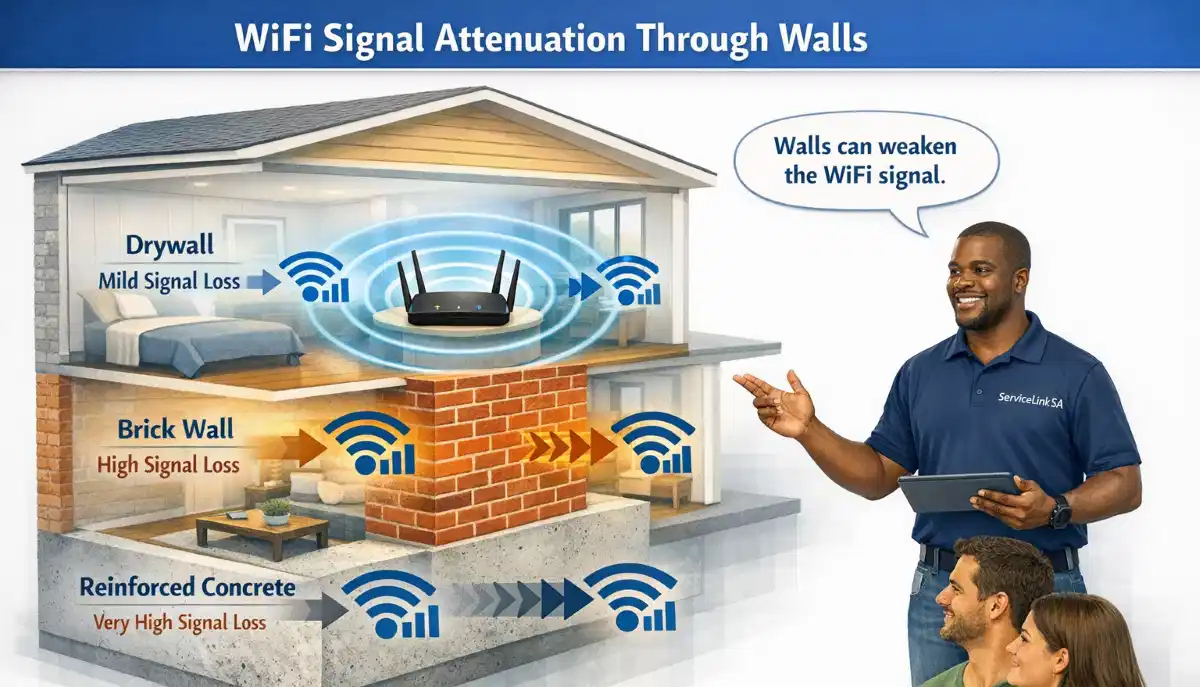
WiFi signals are absorbed, reflected, or blocked by walls. The thicker and denser the wall, the more it weakens the signal.
Wall Types and Signal Loss:
- Drywall: Minimal signal loss (10-20%).
- Timber: Moderate signal loss (20-30%).
- Brick: Significant signal loss (40-60%).
- Concrete: Major signal loss (60-80%).
- Metal: Almost complete signal loss.
Other Obstructions:
- Furniture: Large furniture blocks signals.
- Appliances: Metal appliances block signals.
- Mirrors: Reflect and block signals.
Realistic Example:
A home in Boksburg with brick interior walls: Each wall reduces the signal by 40-60%. Two walls can create a wifi signal dead spot.
For more on walls, see our WiFi through brick walls guide.
🧱 WiFi Dead Zones in Thick Brick Walls
Wifi dead zones in thick brick walls are common in South African homes.
Why Brick Walls Are a Problem:
South African homes often have brick walls. Brick is dense and absorbs WiFi signals. This is a primary cause of wifi dead zones in thick brick walls.
How Much Signal Brick Walls Block:
- Single brick wall: 40-60% signal loss.
- Double brick wall: 60-80% signal loss.
- Multiple walls: Can completely block the signal.
Solutions for Brick Walls:
- Use 2.4 GHz: Penetrates walls better than 5 GHz.
- Add a WiFi extender: Place near the wall.
- Use a mesh network: Nodes in different rooms.
- Run Ethernet cables: Bypass walls entirely.
Realistic Example:
A bedroom in Paarl with thick brick walls: The signal from the living room router may not reach at all. An extender or mesh node in the bedroom is needed.
For more on wifi signal strength through walls, see our brick walls WiFi guide.

Found Dead Zones in Your Home?
Get professional help from local specialists who understand wifi dead zones and wifi signal weak areas.
Free inspections available for wifi coverage issues.
🏠 WiFi Dead Zones in Double Storey House
Wifi dead zones in double storey house are very common.
Why Double Storey Homes Have Dead Zones:
- Concrete floors: Block signals between floors.
- Distance: Rooms are far from the router.
- Multiple walls: Signals must pass through many walls.
Common Dead Zone Locations:
- Upstairs bedrooms: Far from the ground floor router.
- Downstairs rooms: Opposite side from the router.
- Bathrooms: Often have thick walls and plumbing.
Solutions for Double Storey:
- Place router upstairs: If possible, place the router on the upper floor.
- Use a mesh network: Nodes on both floors.
- Use a WiFi extender: Place on the upper floor.
Realistic Example:
A double storey home in Westville: The router is downstairs. The bedrooms upstairs have wifi signal weak areas. A mesh node upstairs solves the problem.
For more on double storey, see our double storey WiFi guide.
📡 Interference from Electronics
Interference is a common cause of wifi dead zones.
Common Interference Sources:
- Microwaves: Operate on 2.4 GHz.
- Cordless phones: Use 2.4 GHz.
- Baby monitors: Use 2.4 GHz.
- Neighbouring WiFi: Too many routers on the same channel.
- Bluetooth: Can interfere with 2.4 GHz.
How Interference Creates Dead Zones:
Interference can cause wifi signal dead spots by overpowering or blocking the WiFi signal. This is especially common in apartments and complexes.
Solutions for Interference:
- Use 5 GHz: Less interference than 2.4 GHz.
- Change WiFi channel: Use a less congested channel.
- Move the router: Keep it away from interference sources.
For more on interference, see our WiFi interference guide.
📍 Poor Router Placement
Poor router placement is a leading cause of wifi dead zones.
Common Placement Mistakes:
- In a corner: Wastes half the signal.
- On the floor: Signals travel outward and downward.
- Behind furniture: Blocks the signal.
- In a cupboard: Completely blocks the signal.
- Near metal: Metal absorbs and reflects signals.
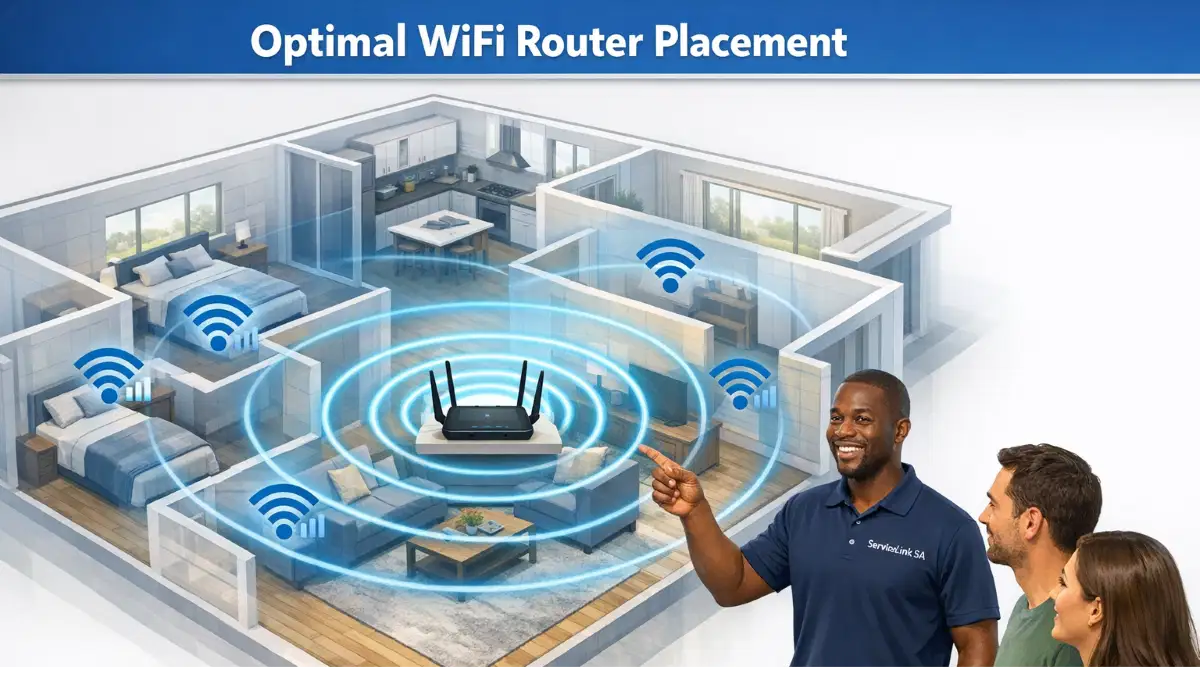
Optimal Router Placement:
- Central location: In the centre of your home.
- Elevated: On a shelf or table.
- Away from walls: At least 0.5 metres from walls.
- Away from interference: Keep it away from electronics.
Realistic Example:
A router placed in a corner of De Aar causes dead zones in the opposite rooms. Moving it to the centre solves the problem.
For more on placement, see our router placement guide.
🔄 Outdated Router Hardware
An outdated router can create wifi dead zones.
Why Old Routers Create Dead Zones:
- Weak signal: Older routers have weaker signals.
- Limited range: Older technology has shorter range.
- Single-band: Only 2.4 GHz, more interference.
- Older standards: 802.11n or older.
When to Replace Your Router:
- It’s more than 3-5 years old.
- It’s single-band (only 2.4 GHz).
- It doesn’t support modern standards.
- You have dead zones that won’t fix.
Signs You Need a New Router:
- Frequent disconnections.
- Slow speeds.
- Dead zones in your home.
- Router feels hot.
For more on replacing routers, see our router replacement guide.
🔍 How to Find WiFi Dead Zones in House
How to find wifi dead zones in house is essential for fixing them.
Method 1: Walk Test
- Walk around your home with your phone.
- Check the WiFi signal bars.
- Note areas with 1 bar or none.
- These are your dead zones.
Method 2: Use a WiFi Analyser App
Download a WiFi analyser app (e.g., NetSpot, WiFi Analyzer). Walk around your home and see a live signal strength map.
Method 3: Speed Test
Run speed tests in different rooms. If the speed drops significantly, you’ve found a wifi signal weak area.
Method 4: Check Your Router’s Admin Page
Some routers show connected devices and signal strength. This can help identify dead zones.
**What to Do Once You Find Dead Zones:**
- Consider moving your router.
- Install a WiFi extender.
- Use a mesh network.
For more on finding dead zones, see our WiFi optimisation guide.
❓ Frequently Asked Questions About WiFi Dead Zones
What causes WiFi dead zones in homes?
What causes wifi dead zones in homes includes distance from the router, walls and obstructions, interference from electronics, poor router placement, and outdated router hardware. Wifi dead zones in thick brick walls and wifi dead zones in double storey house are particularly common in South African homes.
Why are there dead zones in my house WiFi?
Why are there dead zones in my house wifi is caused by physical obstacles like brick walls, distance from the router, interference from electronics, and poor router placement. Understanding what causes wifi dead zones in homes helps you fix them.
How do I find WiFi dead zones in my house?
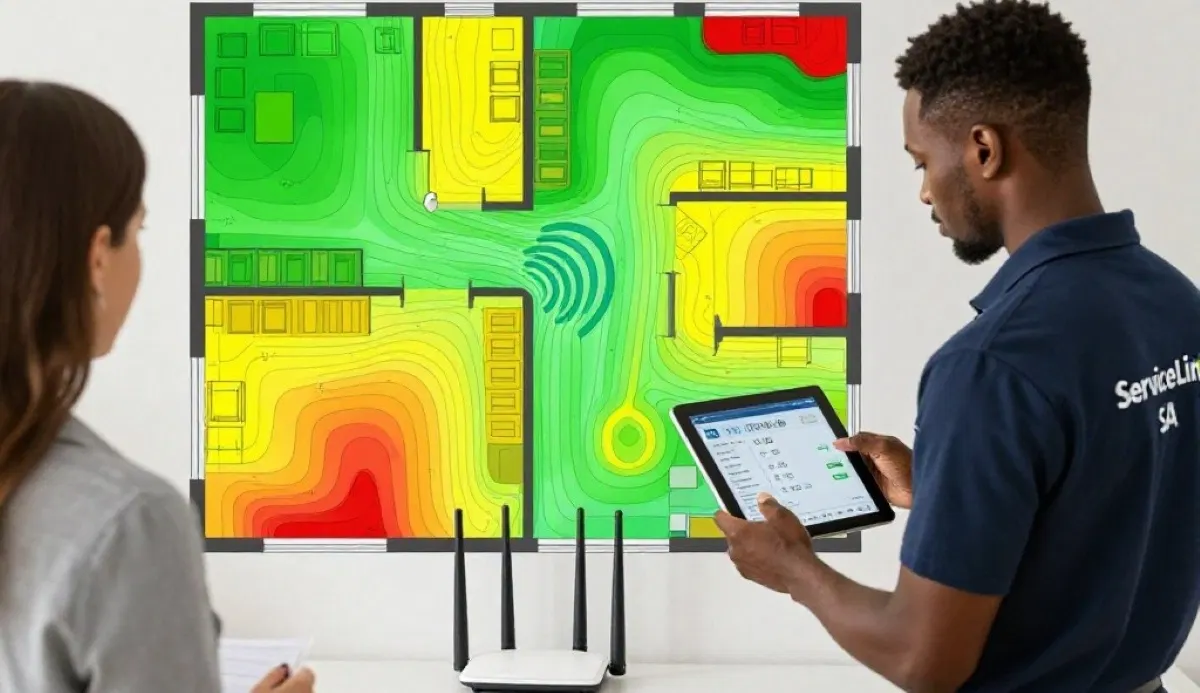
How to find wifi dead zones in house involves walking around with your phone, using a WiFi analyser app, or running speed tests in different rooms. A wifi signal heatmap can visually show wifi signal weak areas.
What are common causes of WiFi dead zones in double storey houses?
Wifi dead zones in double storey house are caused by concrete floors blocking signals, distance from the router, and multiple walls. Solutions include placing the router upstairs or using a mesh network.
Do thick brick walls cause WiFi dead zones?
Yes, wifi dead zones in thick brick walls are very common. Brick absorbs WiFi signals, reducing wifi signal strength. Each brick wall can block 40-60% of the signal, creating wifi signal dead spots.
How can I eliminate WiFi dead zones?
Eliminate wifi dead zones by moving your router to a central location, using a WiFi extender, installing a mesh network, or upgrading your router. A WiFi extender is often the simplest solution.
What is a WiFi signal heatmap?
A wifi signal heatmap is a visual representation of wifi coverage in your home. It shows wifi signal strength across different areas, clearly identifying wifi signal weak areas and dead zones.
Can interference cause WiFi dead zones?
Yes, interference from microwaves, cordless phones, baby monitors, and neighbouring wifi dead zones can cause wifi signal dead spots. Using 5 GHz and changing WiFi channels can reduce interference.
✅ Final Thoughts: Eliminate WiFi Dead Zones for Good
Understanding what causes wifi dead zones in homes is the first step to eliminating them. Whether it’s distance, walls, interference, or poor router placement, there’s always a solution.
Key Takeaways:
- Distance: Move closer or use an extender.
- Walls: Use 2.4 GHz or add an extender.
- Interference: Use 5 GHz and change channels.
- Placement: Move your router to a central location.
- Upgrade: Replace old routers.
Your Next Step: Find the dead zones in your home using the methods in this guide. Fix them with a WiFi extender, mesh network, or better router placement. If you need professional help, ServiceLink SA can connect you with local specialists who understand wifi dead zones and wifi coverage.
Ready to Eliminate Your WiFi Dead Zones?
Get free advice from verified local specialists for wifi dead zones and wifi signal weak areas.
📞 Call us: 073 138 4726 for immediate help finding a specialist near you.
📢 Are You a WiFi Installation Professional?
Join ServiceLink SA’s network of verified contractors and get access to qualified leads for wifi dead zones and wifi coverage projects.
📚 Official resources & standards referenced:
- SANS 10400 – Guidelines for electrical and networking installations in South African homes.
- Department of Energy – Information on energy-efficient electronic equipment.
Information provided for general guidance. For professional what causes wifi dead zones in homes advice, always consult a qualified local technician.
Written by: Innocent T Hanyani
Construction & Home Services Industry Specialist | 21+ Years Experience
Innocent T Hanyani has over two decades of experience working across South Africa’s construction, telecommunications, and home services sectors. Throughout his career, he has worked closely with network installers, IT professionals, and homeowners, gaining practical insight into what causes wifi dead zones in homes. His expertise helps homeowners understand the complexities of wifi dead zones and wifi signal dead spots, from why are there dead zones in my house wifi to wifi dead zones in double storey house, wifi dead zones in thick brick walls, and how to find wifi dead zones in house.